
Office Phone Booth Configuration Guide
Confirm Your Office Pod Configuration Before Requesting a Quote
Before requesting a quote, buyers should confirm the model series, configuration level, glass option, interior and exterior finishes, power and socket requirements, ventilation setup, and any optional functions needed for the project.
This page helps procurement teams review the main configuration choices in a clear order and organize the information needed for a project inquiry, so your team can receive more accurate specification review and quotation support.
Request a Quote Based on Your Final ConfigurationRequest the Latest Spec Sheet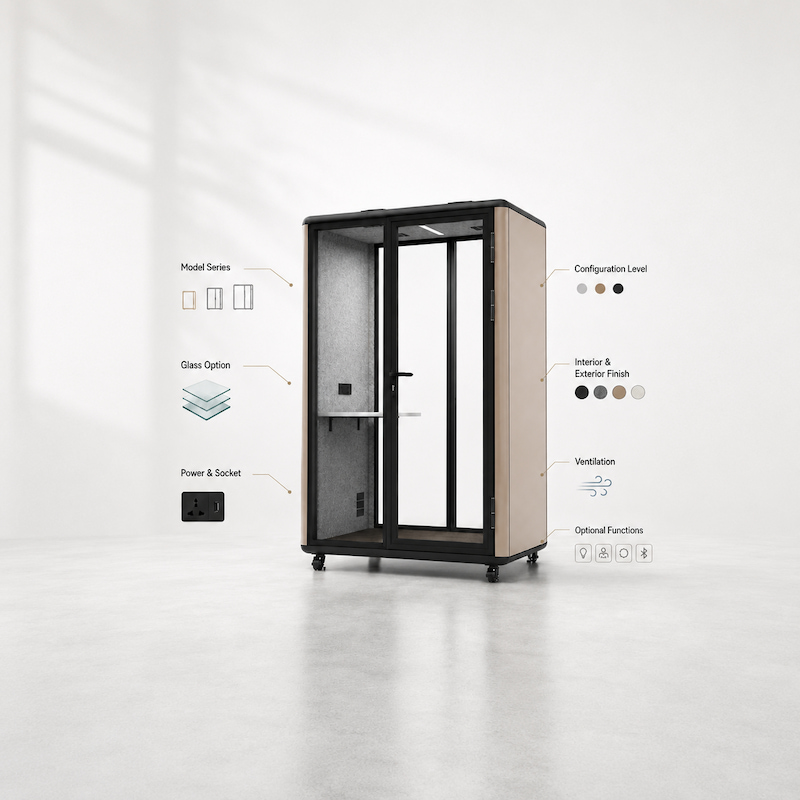
Map Your Office Pod Configuration Choices
Office phone booth configuration is not decided by one option alone. Before sending a project inquiry, buyers usually need to understand how the model series, configuration level, glass option, finish choices, power and socket setup, ventilation system, and optional functions work together.
The table below summarizes the main configuration layers that should be reviewed, helping procurement teams organize the key configuration decisions needed for a project inquiry.
| Configuration Layer | What Buyers Need to Decide | Why It Matters |
|---|---|---|
| Model Series | Model A / B / C | Defines the exterior appearance direction; these are appearance series, not performance grades |
| Configuration Level | Standard / Mid / High | Helps match different project needs with the main configuration package |
| Glass Option | Single, insulated, laminated, or composite glass | Helps buyers review the glass selection as one part of the full booth configuration |
| Finish Choices | Exterior color and interior finish | Helps match the project style and interior finish selection |
| Power & Socket | Destination country, socket standard, USB / Type-C, and network needs | Helps confirm power, socket, and connection requirements before quotation |
| Ventilation & Options | Fan, lighting, occupancy sensor, reservation system, air refresh, or air conditioning options | Supports comfort requirements and project-based option review |
Model A, Model B, and Model C should be understood as exterior appearance series. They should not be treated as performance grades, acoustic grades, price grades, or configuration levels. Before requesting a project quotation, buyers should confirm both the model series and the configuration level.
Compare Standard, Mid, and High Configuration Levels
After choosing the model series and pod capacity, buyers should review which configuration level matches the intended use, option needs, and project requirements. Standard, Mid, and High are different configuration packages. The table below summarizes the three common configuration levels and helps buyers understand which configuration direction may fit different project needs.
| Configuration Level | Typical Configuration Direction | Typical Buyer Need | Confirmation Boundary |
|---|---|---|---|
| Standard | Essential office booth configuration for daily workplace use | Buyers who need a basic configuration for daily calls, short meetings, and general office privacy needs | Suitable for projects with basic configuration needs and lower acoustic expectations; the final configuration should still be confirmed before quotation. |
| Mid | A balanced configuration for buyers with a defined budget and specific configuration requirements | Buyers who want a better balance of configuration, comfort, and acoustic expectations | Configuration details should be confirmed based on the selected model, glass option, functional needs, and project requirements. |
| High | A higher configuration package for stronger comfort, acoustic setup, and smart feature needs | Buyers with a sufficient budget, premium office projects, or higher expectations for acoustic experience and smart features | The High configuration is more complete in acoustic setup and smart features; the specific setup should still be confirmed based on project requirements. |
Different buyers may choose different configuration levels based on budget, functional needs, and acoustic expectations. In actual procurement, this table should be used as a configuration selection reference only. The final configuration and quotation should still be confirmed with the sales team based on specific project requirements.
Review Glass Options and Acoustic Boundaries
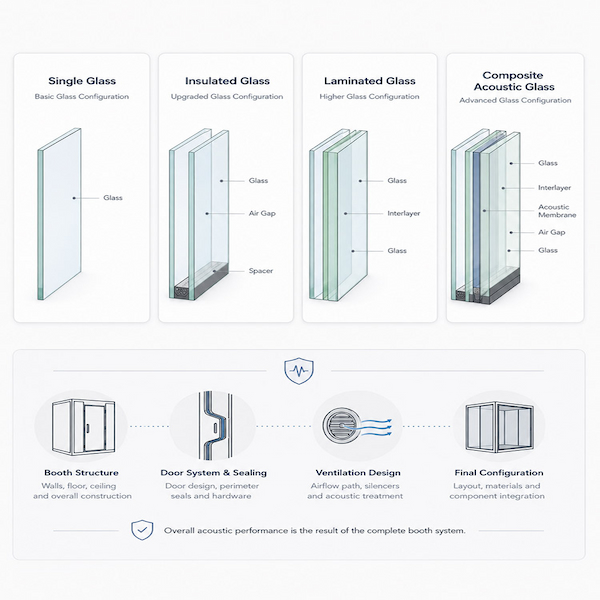
Glass configuration is an important part of office phone booth configuration, but whole-booth acoustic performance should also be evaluated together with the booth structure, door system, sealing, ventilation design, and final configuration. When selecting a glass option, buyers should consider the project’s privacy needs and acoustic expectations as a whole.
| Glass Option | Configuration Position | Suitable Buyer Needs |
|---|---|---|
| Single Glass | Basic glass configuration | Suitable for daily office use and basic configuration needs |
| Insulated Glass | Upgraded glass configuration | Suitable for projects that want improved glass-level sound insulation compared with the basic configuration |
| Laminated Glass | Higher glass configuration | Suitable for projects with more defined speech privacy and acoustic comfort expectations |
| Composite Acoustic Glass | Advanced glass configuration | Suitable for projects with higher requirements for acoustic configuration and speech privacy expectation |
If the project or end user has a specific dB target, acoustic requirement, or speech privacy concern, buyers should request the relevant acoustic evidence from the supplier
Review Exterior Color, Interior Finish, and Visual Fit Options
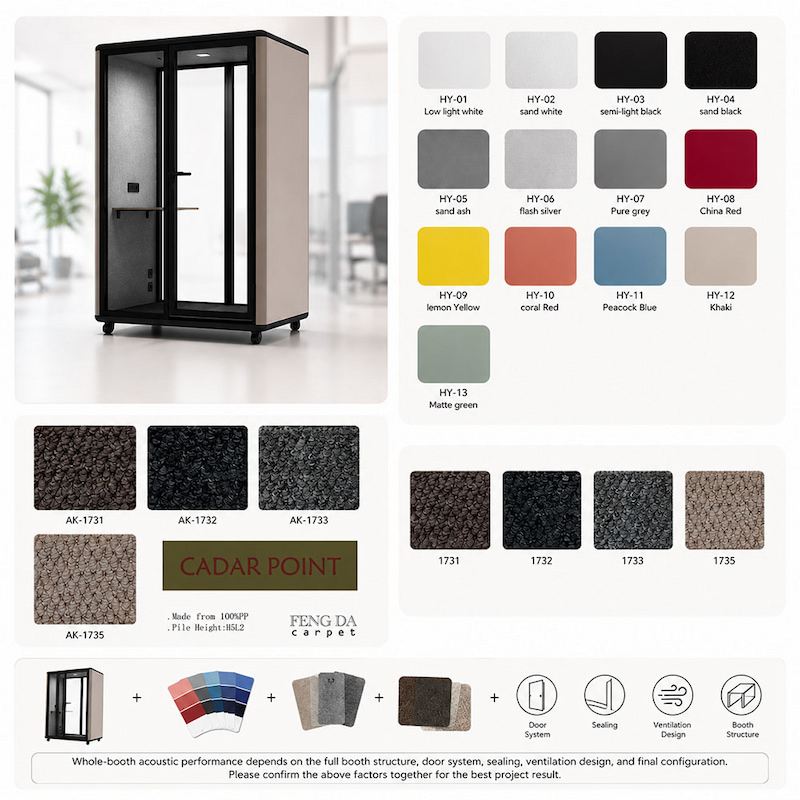
Exterior color and interior finish choices should match the office interior, project style, and overall workspace environment, helping the office phone booth fit more naturally into the workspace. Before quotation, buyers should confirm the main color and finish direction so the project team can review the configuration more accurately.
Color and interior finish choices should be confirmed together with the selected model series, configuration level, and project requirements.
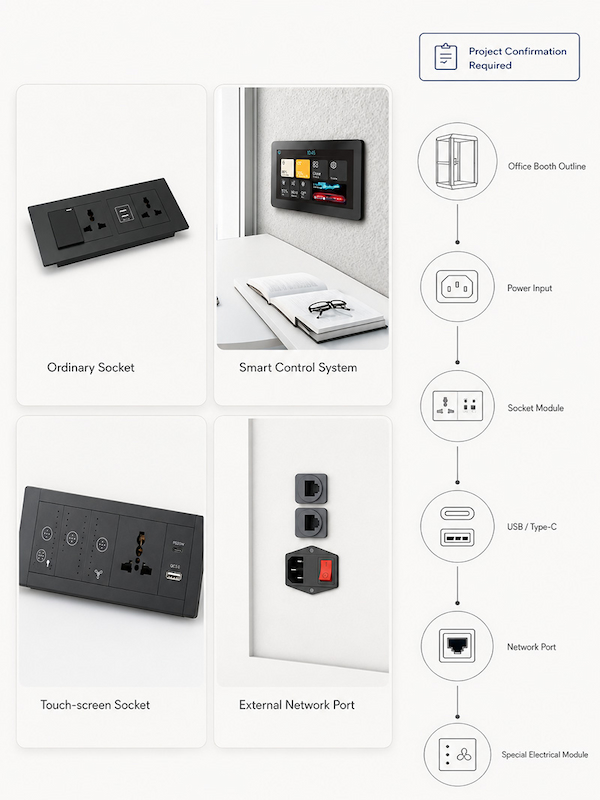
Confirm Power, Socket, USB / Type-C, and Network Requirements
Power, socket, and network interface details should be confirmed before quotation because voltage, socket configuration, main power plug type, and interface requirements may vary by country or region. The table below helps buyers quickly review the key electrical and connection items that need to be confirmed, so the project team can prepare a more accurate configuration review and quotation.
| Confirmation Item | What Buyers Should Confirm | Why It Matters |
|---|---|---|
| Destination Country | Project country or region | Helps confirm the suitable voltage, power cord, socket configuration, and main power plug type |
| Socket Configuration | Two functional socket module options are available; buyers should confirm which option is required | Different socket configurations may affect configuration confirmation and quotation |
| Power Requirement | Whether the project requires 110V, 220V, or another local power requirement | Helps confirm whether the power connection method fits the project requirements |
| USB / Type-C | Whether USB or Type-C charging ports are needed | Supports daily office use and device charging needs |
| External Network Port | Whether a wired network interface is needed | Supports video meetings, project communication, or a more stable network connection |
| Special Electrical Module | Special brand, special socket module, or special electrical component requirements | Should be treated as project-specific confirmation items; availability of the relevant CE certificate should be confirmed separately |
Special socket modules, non-standard electrical requirements, or electrical component evidence should be confirmed with the project team before quotation. Whether a relevant CE certificate can be provided should be confirmed separately based on the specific electrical module, component scope, and project requirements.
Review Ventilation, Lighting, and Comfort Options
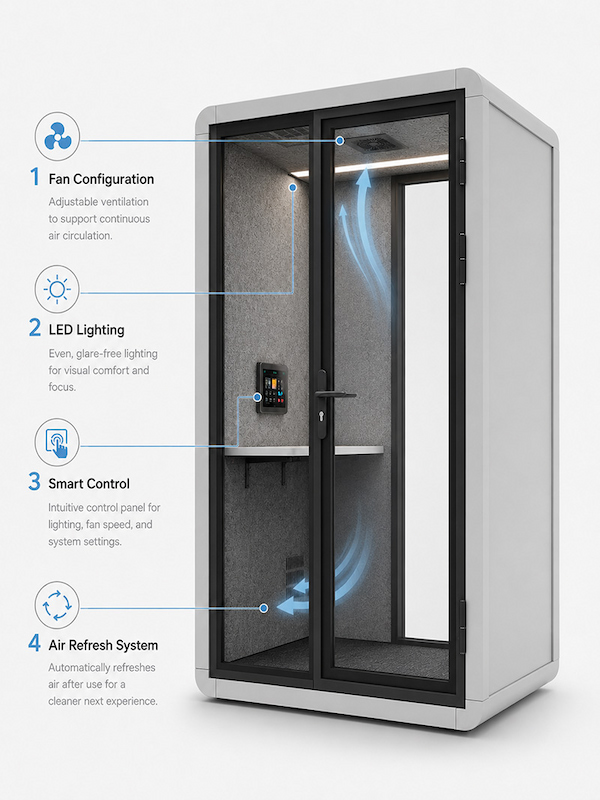
Ventilation and lighting choices affect how the office phone booth feels during daily use, phone calls, and video meetings. Before quotation, buyers should review the available fan, lighting, smart control, and air refresh system configurations.
| Configuration Area | What Buyers Should Review | Why It Matters | Boundary |
|---|---|---|---|
| Fan Configuration | Two fan options are available: regular fan and turbo fan | Helps improve air circulation and user comfort inside the booth | Fan noise data can be confirmed based on the selected fan configuration, such as 25 dB / 28 dB |
| LED Lighting | Buyers can choose strip LED lighting or round LED lighting, and confirm the suitable color temperature and brightness | Supports daily calls, focused work, and video meeting use | The lighting configuration helps reduce facial shadows or double-shadow effects |
| Smart Control | Whether airflow and lighting can be adjusted | Users can adjust lighting brightness and airflow level inside the booth based on their needs | Smart accessories should be confirmed at the inquiry stage; different configurations may affect the final setup and quotation |
| Air Refresh System | After use, the system can automatically turn on the fan based on a preset cycle, such as running for 5 minutes once every hour | Helps maintain air circulation inside the booth and improves comfort before the next use | A user-friendly upgrade to the ventilation system |
Ventilation, lighting, and comfort options should be confirmed together with the selected model series, configuration level, and project requirements.
Review Optional Smart Functions and Project-Based Options
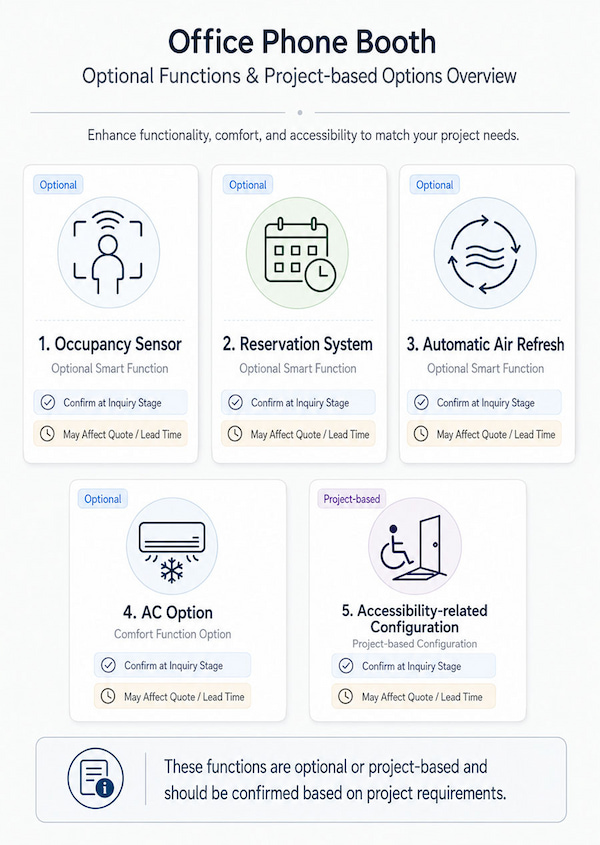
In addition to the basic configuration, office phone booths can be equipped with a range of functional options based on project needs, such as an air refresh system, reservation system, AC option, and accessibility-related configuration. Buyers should confirm whether these functions need to be included in the project plan at the inquiry stage, as they may significantly affect the final configuration, quotation, and lead time.
Prepare Your Configuration Checklist Before Requesting a Quote
The configuration checklist below helps buyers organize the main project information before sending an inquiry, so the project team can review their configuration more accurately and prepare a quotation.
FAQ
Are Model A / B / C performance grades?
No. They are appearance series, not performance, acoustic, price, or configuration grades.
Do glass options equal acoustic performance?
No. Glass is one configuration factor. Whole-booth acoustic performance depends on the full booth structure and tested conditions.
Are sensors and reservation systems standard?
No. They should be confirmed as optional or project-based functions.
When should buyers request acoustic evidence?
Buyers should request acoustic evidence if the project has a dB target, speech privacy requirement, or acoustic review need.
When should buyers request the latest spec sheet?
Buyers should request the latest spec sheet when current dimensions, layout review, BOQ, or tender documents are needed.
Final Request Route
Buyers can send the configuration checklist above to the project team to request a quotation, the latest spec sheet, or acoustic evidence based on specific project requirements.