
Office Phone Booth Installation, Site Readiness & Delivery Support
Office pod installation should be planned as early as the quotation, order confirmation, or shipment-planning stage, not after the booth arrives on site. This page helps B2B project buyers, dealers, and contractors prepare for office phone booth installation by confirming site access, moving path, power, and network requirements in advance.
Check doorways, elevators, corridors, floor conditions, and the planned booth location before production or shipment.
Prepare power, network access, electrician support, and site-team coordination before project handover.
Request installation documents, remote guidance, and delivery reference materials before shipment or container loading.
Request Office Pod QuoteRequest Installation Documents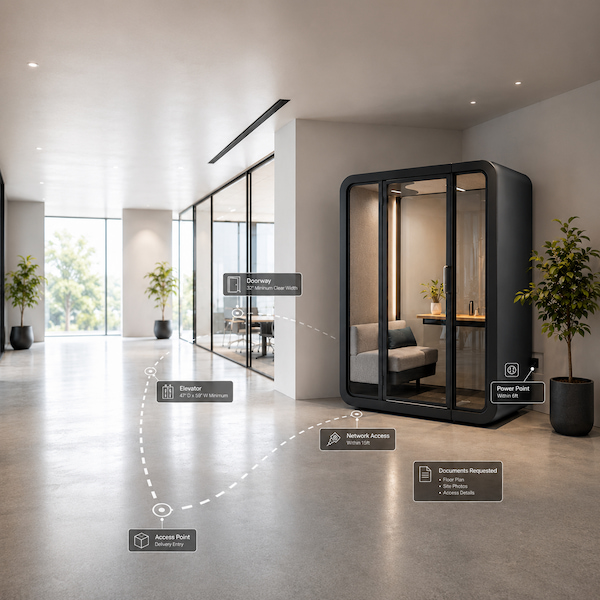
Office Pod Installation Checklist: What Buyers Should Confirm
An office pod installation checklist helps buyers and site teams review key site conditions before production scheduling, shipment planning, or container loading. The goal is to reduce the risk of finding moving, placement, or installation coordination issues only after the goods arrive on site.
| Checklist Area | What Buyers Should Prepare or Confirm |
|---|---|
| Booth placement | Compare the layout drawing with the actual site position, and confirm whether the final booth location, surrounding clearance, and layout dimensions are aligned. |
| Site access route | Confirm the access route from the unloading area to the planned booth location, including entrances, corridors, elevators, and turning areas. |
| Moving conditions | Review floor conditions, entrance dimensions, elevator dimensions, and packed product dimensions to decide whether the packing method or moving plan should be adjusted in advance. |
| Installation support | Before the goods arrive, confirm whether the installation manual, installation video, remote guidance, and related delivery reference materials can be requested. |
If site access is uncertain, buyers should confirm layout drawings, site photos, and current project dimensions before shipment planning.
Installation Responsibility Matrix for Dealers, Contractors, and Site Teams
Office phone booth installation is not a single action. It requires coordination between the factory, dealer / contractor, site team, and buyer. Each party should confirm its scope of responsibility before shipment or site handover to avoid discovering unclear responsibilities for unloading, moving, installation, or final site acceptance only after the goods arrive on site.
| Project Role | Typical Responsibility Before Installation |
|---|---|
| Factory / project team | Provide the installation manual, installation video, remote technical support, and project reference materials. If on-site installation support is required for the project, it should be discussed in advance and the support scope should be confirmed. |
| Dealer / contractor | Coordinate with the buyer on local installers, unloading and moving arrangements, electrician support, site communication, and project schedule. |
| Site team | Receive the goods in the confirmed installation area, support on-site moving, move the product to the designated location, sort the components according to their labels, and install the booth according to the steps in the installation manual. |
| Buyer / project owner | Provide necessary support for the installation team and confirm the final site acceptance or handover process. |
Each role should clearly understand its own responsibility scope and coordinate before project execution begins.
On-site installation support should be discussed in advance when required.
Power, Socket, Network and Electrician Preparation
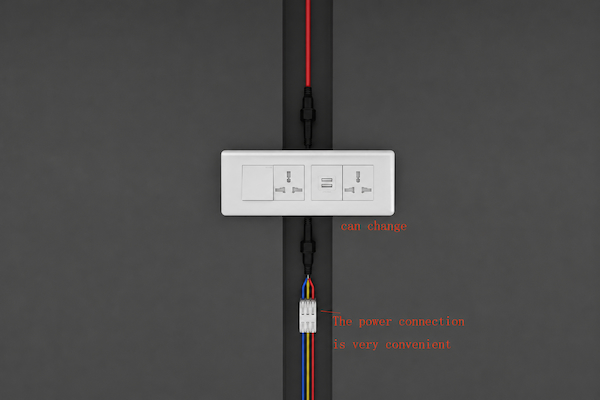
Before office phone booth installation, buyers should confirm the site electrical and network conditions in advance. Power connection, socket standard, network requirements, and necessary electrician coordination should be clearly confirmed before installation begins to avoid last-minute coordination after the booth arrives on site.
| Preparation Area | What to Confirm |
|---|---|
| Power point | Confirm where the booth will connect to power and whether the connection point is ready for electrical connection. |
| Socket requirement | Check the socket standard required for the project destination and complete the review before final confirmation. |
| Network access | Confirm whether the booth location requires network access, cabling preparation, or IT coordination. |
| Electrician support | Check whether a local electrician is needed for on-site electrical coordination. |

Packing, Loading and Delivery Information as Project Reference
Packing, loading, and delivery information can help buyers prepare receiving, unloading, moving, and internal handover plans before the goods are shipped.
Packing reference
Packing dimensions, packing weight, and basic packing information to help buyers understand how the goods can be received, unloaded, and moved after they arrive at the receiving location.
Loading reference
When available, buyers can request loading photos or loading records to check the placement of the goods during receiving and unloading, and to use as a project communication reference if damage or any irregularity is found.
Delivery coordination
Information needed for receiving arrangements, site contact preparation, unloading coordination, internal moving, and handover planning.
Special project notes
If the project has special packing, moving, or delivery requirements, these should be discussed before packing confirmation.
Basic packing and loading information may vary by order, destination, and project requirement. Buyers should request the current project packing and loading reference materials from the supplier before final delivery.
Project Handover FAQ and Request Route
FAQ
Is on-site installation included for every order?
No. We can provide on-site installation support, but not every order requires on-site installation support.
Can installation documents or videos be requested?
Yes. Usually after container loading, we provide a detailed installation manual and installation video. The installation manual is provided in PDF format, and the installation video is provided in MP4 format.
What should buyers prepare before requesting installation support?
Buyers should prepare the layout drawing, site access notes, project schedule, and main project contact. The installation manual and installation video can be requested from us as installation support materials.
Where should buyers go for warranty, maintenance, or spare parts questions after installation?
For after-sales support, buyers should contact our after-sales team and complete the after-sales form.
Related request routes:
Resource Hub: Request installation documents, delivery reference materials, or project support files.
FAQ: View common installation, site-readiness, and handover questions.
Warranty Support: Ask about after-sales, maintenance, or spare parts support after installation